|
Different types of layers
In step 5, the user can upload additional basemap layers to complete the content of the map. The additional layers will be listed in the table and their order can be changed manually from the arrows on the right.
The layer which listed in the first row of the table is the one which will be on the top of the map.
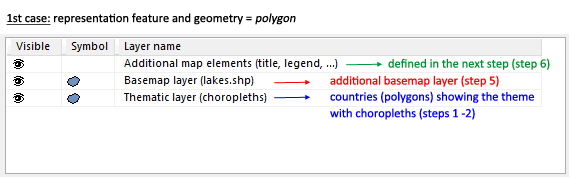
Arriving at step 5, you see already some layers listed on the table. There are two cases of layers existed in this list.
1st case: The representation feature used to visualize the theme of the map at step 1 is the same with the geometry loaded at step 2. In this case, the layers are:
a) Additional map elements (title, legend) and
b) Thematic layer
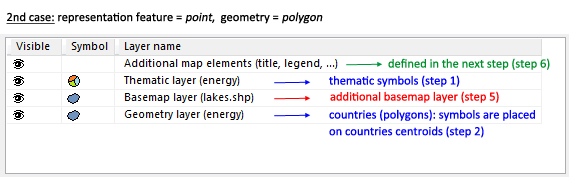
2nd case: the representation feature is different from the geometry, e.g. a map with charts (representation feature = point) over European countries
(geometry = polygon). In this case, an additional layer appears on the list called geometry layer. This layer shows the background of the map but it is different from the basemap layers which can be added by the user to the map,
because it is created automatically with the generation of thematic layer. In this case, the layers are:
a) Additional map elements (title, legend) and
b) Thematic layer
c) Geometry layer
Visit the OCAD Wiki for more information.
|