|
Data Classification Data classification involves combining raw data into classes or groups with each class represented by a unique symbol. The individuality and detail of each data value is lost. Information is conveyed through identification of each class boundaries. Classification reduces the complexity of the map image, helps to organize the mapped information and in this way, enhance the communication with the map (Dent, 1999). Data is classified for three reasons:
Data classification can be used in a variety of visualization methods. In case of maps with symbols, the classification of data is relevant to range-graded scaling, in which raw data is grouped into classes, each of which is represented with a different sized symbol (Slocum et al, 2005). Once you have decided that classification is appropriate for you data, you need to consider the number of classes to be shown, the classification method to be used and the symbol sizes to represent each class. These decisions will be made in Wizard Step 4 according to the selected visualization method.
The same principle is followed also for flow maps where the width of each linear element is scaled gradually to the quantity it represents.
For choropleth maps, the colour shades are generally based on the conventional "maximum-contrast" approach, using equally spaced tones from one class to another.
According to Slocum (2005), there are two criteria to be considered in order to decide whether a classified or an unclassified map should be created. The first has to do with the intent to portray correct numerical relationships among the data. If this is what you need, then unclassified maps are appropriate because they provide a spatial expression of numerical relations in the data. A second criterion is whether the intentions is to present or explore data. For presentation purposes, it is generally only possible to show one map of a distribution, and thus one must make a choice between unclassified and classified maps. Maybe in this case, a classified map is more meaningful for the user. However, for exploring data, several visualizations of the data are possible.
References: Visit the OCAD Wiki for more information. |
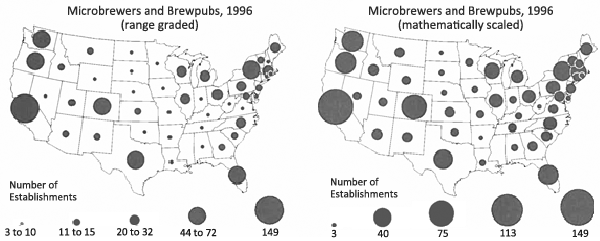 Fig.1 Range-graded and mathematically scaled maps for both the standardized microbrewery and brewpub data (Slocum et al, 2005).
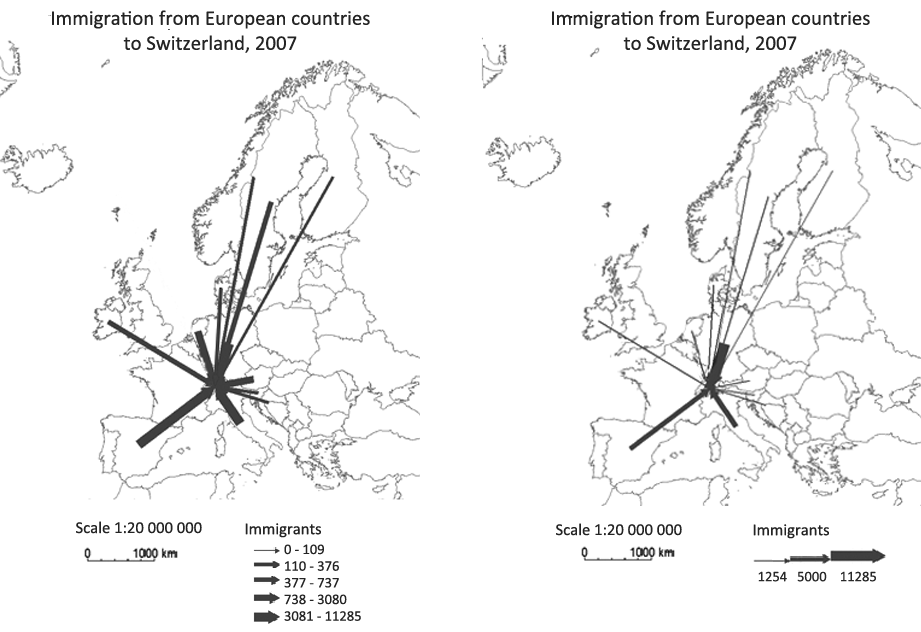 Fig.2 Classified (left) and unclassified map (right) for immigration from European countries to Switzerland in 2007 (OCAD Thematic Mapper).
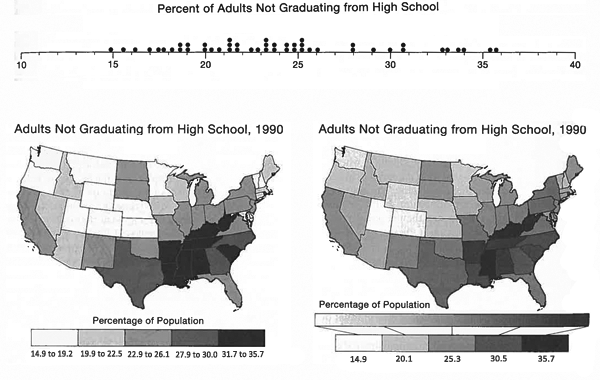 Fig.3 Dispersion graph and maps, optimally classified (left) and unclassified (right), of high school education (Slocum et al, 2005).